

If you're running Meta Ads (facebook / instagram) and care about accurate attribution - this guide is for you.
We'll walk through the right way to implement UTMs, common mistakes to avoid, and the exact tracking template we use at Terrific Digital to ensure clean, reliable data across your entire stack.
Why UTMs Matter (Quickly)
UTMs are the foundation of marketing attribution.
They allow platforms like Google Analytics 4, Amplitude, Mixpanel, HubSpot & CRMs to understand where your traffic is coming from, which campaigns drove it, and what actually worked.
Without UTMs, your data becomes fragmented, inconsistent, or completely unusable.
First, What NOT To Do?
A very common mistake is adding UTMs manually in the Ad’s “Website URL” field:

This approach creates several problems:
- Possible inconsistent naming conventions
- Human errors and broken tracking
- Difficult maintenance and scaling
What You SHOULD Do instead
The correct approach is to implement dynamic UTMs in the Ad’s “URL parameters” field.
This ensures consistency across all campaigns and scalable tracking as you grow.
You can find this field by going to your Ad’s settings and scroll to the "Tracking" section:
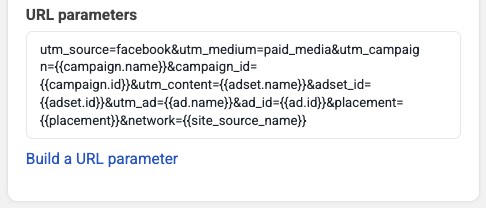
The Terrific Digital Tracking Template
Here’s the exact template we use for our agency's clients:
utm_source=facebook&utm_medium=paid_media&utm_campaign={{campaign.name}}&utm_content={{adset.name}}&utm_id={{campaign.id}}&td_src=facebook&td_med=paid_media&td_cmp={{campaign.name}}&td_cmp_id={{campaign.id}}&td_grp={{adset.name}}&td_grp_id={{adset.id}}&td_ad={{ad.name}}&td_ad_id={{ad.id}}&td_plc={{placement}}&td_net={{site_source_name}}This template dynamically pulls values using Meta’s macros and applies them automatically to every ad, essentially adding the following URL parameters to the destination URL:
- utm_source = facebook
- utm_medium = paid_media
- utm_campaign = {{campaign.name}}
- utm_id = {{campaign.id}}
- utm_content = {{adset.name}}
- td_src = facebook
- td_med = paid_media
- td_cmp = {{campaign.name}}
- td_cmp_id = {{campaign.id}}
- td_grp = {{adset.name}}
- td_grp_id = {{adset.id}}
- td_ad = {{ad.name}}
- td_ad_id = {{ad.id}}
- td_plc = {{placement}}
- td_net = {{site_source_name}}
To read more about how to use dynamic parameters in Meta Ads, you can read their official documentation here.
Here’s an example of how your final landing page URL might look like with our tracking template:
https://mywebsite.com/?utm_source=facebook&utm_medium=paid_media&utm_campaign=My%20Campaign%20Name&utm_content=My%20Adset%20Name&utm_id=123456789&td_src=facebook&td_med=paid_media&td_cmp=My%20Campaign%20Name&td_cmp_id=123456789&td_grp=My%20Adset%20Name&td_grp_id=123456789&td_ad=My%20Ad%20Name&td_ad_id=123456789&td_plc=facebook_feed&td_net=fbWhy We Use "td_x" Parameters (Backup Tracking)
If you look closely, you’ll probably notice we duplicate parameters like:
- utm_source → td_src
- utm_medium → td_med
- utm_campaign → td_cmp
- utm_id → td_cmp_id
- utm_content → td_grp
We do this because UTMs are not always reliable. Why not? BECAUSE UTMS CAN BE DROPPED.
Some browsers and privacy tools strip UTMs before the page even loads. This happens due to privacy protections, tracking prevention mechanisms and URL sanitization. For example:
- Safari (ITP)
- Brave Browser
- Firefox (strict mode)
- Privacy extensions (Ad-blockers, uBlock, etc.)
- Other browsers who might jump on the privacy wagon in the future
These can remove standard known UTMs like:
❌ utm_source
❌ utm_medium
❌ utm_campaign
❌ utm_id
❌ utm_content
❌ utm_term
That's why we decided to use our td_x parameters as a backup layer.
This way, even if the standard UTMs are stripped, our td_x parameters remain intact, and you still retain your precious attribution data.
Also, these additional parameters capture values that are not included in the original standard UTMs, such as Ad ID, Ad Name and Ad Set ID.
Why This Matters
If you’re working with raw data (e.g. BigQuery), this becomes extremely powerful.
You can:
- Detect missing UTMs
- Reconstruct attribution
- Map backup parameters back to standard UTMs
For example, you can replace td_src with utm_source to retroactively fix any compromised URLs, and maintain data integrity even if it was lost.
We're usually also doing this in a Google Tag Manager variable that fixes the page's URL, and passes it on to GA4 as the page_location parameter, essentially overriding GA4's default page URL.
Using HubSpot? Please Read This!
If you're using HubSpot Ads integration, there’s an important caveat. HubSpot has an auto-tracking feature that:
💀 Overrides your UTMs
💉 Injects its own tracking template
👎 Is not customizable
This will surely break your clean tracking structure.
Our solution - TURN OFF HUBSPOT'S AUTO-TRACKING FEATURE:
- Go to HubSpot → Marketing → Ads
- Open Settings
- Locate Auto-tracking / Tracking Templates
- Turn it OFF

Important Cleanup Step
After disabling the auto-tracking feature, make sure to audit your ads and remove any existing UTMs that might have been added by HubSpot.
HubSpot-Compatible Template
If you still want HubSpot to receive its required parameters, use this version instead:
utm_source=facebook&utm_medium=paid_media&utm_campaign={{campaign.name}}&utm_content={{adset.name}}&utm_id={{campaign.id}}&td_src=facebook&td_med=paid_media&td_cmp={{campaign.name}}&td_cmp_id={{campaign.id}}&td_grp={{adset.name}}&td_grp_id={{adset.id}}&td_ad={{ad.name}}&td_ad_id={{ad.id}}&td_plc={{placement}}&td_net={{site_source_name}}&hsa_cam={{campaign.id}}&hsa_grp={{adset.id}}&hsa_ad={{ad.id}}&hsa_net=facebook&hsa_src={{site_source_name}}&hsa_ver=3This ensures your UTMs are clean while still providing proper tracking for HubSpot.
Final Thoughts
If you implement Meta tracking correctly:
- You eliminate human error
- You ensure consistent attribution across all platforms
- You protect your data against browser-level tracking loss
This is one of those small setup decisions that has a massive long-term impact.
Need any help with your Meta Ads? Feel free to reach out to us, let's figure out how we can help you: